<?xml version="1.0" encoding="utf-8"?><feed xmlns="http://www.w3.org/2005/Atom" ><generator uri="https://jekyllrb.com/" version="3.9.5">Jekyll</generator><link href="/feed.xml" rel="self" type="application/atom+xml" /><link href="/" rel="alternate" type="text/html" /><updated>2024-03-07T10:39:48+00:00</updated><id>/feed.xml</id><title type="html">xtenduke</title><subtitle></subtitle><author><name>Jake Laurie</name></author><entry><title type="html">Nestjs typed configuration</title><link href="/backend/2024/03/06/nestjs-typed-config.html" rel="alternate" type="text/html" title="Nestjs typed configuration" /><published>2024-03-06T16:00:00+00:00</published><updated>2024-03-06T16:00:00+00:00</updated><id>/backend/2024/03/06/nestjs-typed-config</id><content type="html" xml:base="/backend/2024/03/06/nestjs-typed-config.html"><![CDATA[<h4 id="problem">Problem</h4>
<p>The OOTB <a href="https://nestjs.com">NestJS</a> configuration support leaves a lot to be desired, mainly it lacks any form of validation or schema.</p>

<p>If you’re reading this you probably know that having a webapp running with malformed configuration is not a good idea. The aim for this solution is that the application will fail to deploy if your configuration is wrong, as the validation will fail on boot.</p>

<h4 id="solution">Solution</h4>
<p>Fortunately, you can roll your own solution with <a href="https://joi.dev/">joi</a> pretty easily.
Simply, it allows you to inject typed config objects into your Injectables.</p>

<p>The following is an example of one of the configuration classes, each of the props are assigned from process.env. Note that it extends the <code class="language-plaintext highlighter-rouge">BaseConfig</code> class, which is below.</p>

<div class="language-plaintext highlighter-rouge"><div class="highlight"><pre class="highlight"><code>// database.config.ts
import { BaseConfig } from "@/config/config";
import * as Joi from "joi";

export class DatabaseConfig extends BaseConfig {
  public host = process.env.POSTGRES_HOST;
  public port = Number.parseInt(process.env.POSTGRES_PORT, 10);
  public username = process.env.POSTGRES_USERNAME;
  public password = process.env.POSTGRES_PASSWORD;
  public database = process.env.POSTGRES_DATABASE;

  public schema = Joi.object&lt;DatabaseConfig&gt;({
    host: Joi.string().min(1).required(),
    port: Joi.number().min(4).required(),
    username: Joi.string().min(1).required(),
    password: Joi.string().min(1).required(),
    database: Joi.string().min(1).required(),
  });
}

</code></pre></div></div>

<p>The BaseConfig class just handles joi schema validation. It would be best here to throw an exception that is caught by your request/response pipeline so nice errors can be returned to the user.</p>
<div class="language-plaintext highlighter-rouge"><div class="highlight"><pre class="highlight"><code>// config.ts
import { Logger } from "@nestjs/common";
import { AnySchema } from "joi";

export abstract class BaseConfig {
  public validate(): this {
    const validationResult = this.schema.validate(this, { allowUnknown: true });
    if (validationResult.error) {
      throw new Error(
        `Failed validating ${this.constructor.name} - ${validationResult.error.message}`,
      );
    }

    // don't pass the schema prop
    delete this.schema;

    Logger.log(
      `Loaded config ${this.constructor.name} - ${JSON.stringify(this)}`,
    );
    return this;
  }

  public abstract schema?: AnySchema;
}
</code></pre></div></div>

<p>This configuration can be injected into <code class="language-plaintext highlighter-rouge">@Injectable()</code> classes</p>
<div class="language-plaintext highlighter-rouge"><div class="highlight"><pre class="highlight"><code>// database.service.ts
@Injectable()
export class DatabaseService {
  constructor(private readonly config: DatabaseConfig) {
  ...
</code></pre></div></div>

<p>The config objects are provided by the ConfigProvider, which must be used in every module like this.</p>
<div class="language-plaintext highlighter-rouge"><div class="highlight"><pre class="highlight"><code>// database.module.ts
@Module({
  imports: [],
  providers: [DatabaseService, ConfigProvider(DatabaseConfig)],
  exports: [DatabaseService]
})
export class DatabaseModule {}
</code></pre></div></div>

<p>The config provider is pretty simple, it uses the type passed into the provider function to construct the object (which pulls the values from env env), then it calls the validation function.</p>
<div class="language-plaintext highlighter-rouge"><div class="highlight"><pre class="highlight"><code>// config.provider.ts
import { Provider, Type } from "@nestjs/common";
import { BaseConfig } from "./config";

export const ConfigProvider = &lt;T extends BaseConfig&gt;(clazz: Type&lt;T&gt;) =&gt; {
  return {
    provide: clazz,
    useFactory: (): T =&gt; {
      return new clazz().validate();
    },
  } as Provider;
};

</code></pre></div></div>

<p>Arguably the most important part of the setup, since we are using process.env, we need to use something like <a href="https://www.npmjs.com/package/dotenv">dotenv</a> to load config into <code class="language-plaintext highlighter-rouge">process.env</code>.</p>

<div class="language-plaintext highlighter-rouge"><div class="highlight"><pre class="highlight"><code>import { NestFactory } from "@nestjs/core";
import * as dotenv from "dotenv";
import { AppModule } from "./app.module";

async function bootstrap() {
  dotenv.config(); // load the .env file
  const app = await NestFactory.create(AppModule, { cors: true });
  await app.listen(process.env.PORT || 3000);
}
bootstrap();
</code></pre></div></div>

<h4 id="what-next">What next?</h4>
<p>This is a good extensible starting point for most applications. You could extend this by combining it with built in NestJS <code class="language-plaintext highlighter-rouge">ConfigService</code> which would give you the ability to easily manage different environments, instead of using dotenv.</p>

<p>Further, you could create custom environment files in json, with process env overrides, for the best of both worlds.</p>]]></content><author><name>Jake Laurie</name></author><category term="backend" /><summary type="html"><![CDATA[Problem The OOTB NestJS configuration support leaves a lot to be desired, mainly it lacks any form of validation or schema.]]></summary></entry><entry><title type="html">Windows hybrid GPU management</title><link href="/linux/2024/02/24/win-hybrid-gpu.html" rel="alternate" type="text/html" title="Windows hybrid GPU management" /><published>2024-02-24T16:00:00+00:00</published><updated>2024-02-24T16:00:00+00:00</updated><id>/linux/2024/02/24/win-hybrid-gpu</id><content type="html" xml:base="/linux/2024/02/24/win-hybrid-gpu.html"><![CDATA[<p>Nvidia hybrid gpu setups in linux are incredibly painful due to poor driver support, nvidia drivers don’t properly support being run as a secondary gpu, I could go on and on about this…</p>

<p>It seems that windows is not immune to hybrid gpu pains. 
I recently discovered failures in Windows 11 23H2 switching from dGPU to iGPU on my Lenovo P1 Gen 5 (intel Xe / nv 3070Ti).</p>

<h3 id="behaviour">Behaviour</h3>
<p>This machine is configured in a very common way, iGPU and dGPU are connected to the internal screen through a multiplexer, HDMI and USB-C ports are wired directly to the Nvidia GPU.</p>

<p>This means that the dGPU must be active to use external displays, but can be powered down for a portable configuration. The fact that the gpu can power down is really useful as even idle the gpu draws ~15w.</p>

<p>Typical behaviour in Windows for hybrid GPU setups is that the “High performance” gpu will be powered if either:</p>

<ul>
  <li>A high-performance application is running, i.e. game</li>
  <li>An external display is plugged in</li>
</ul>

<p>My experience has been that the dGPU doesn’t actually power down when the external display is disconnected, resulting in terrible battery life after unplugging my machine from displays.</p>

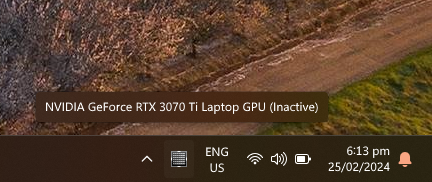
<p>Based on information from Nvidia control panels “gpu activity icon” I have been able to deduce that the dGPU isn’t powering down because there are applications running on it. To me this shows that it’s a windows issue, surprise surprise…</p>

<h3 id="monitoring">Monitoring</h3>
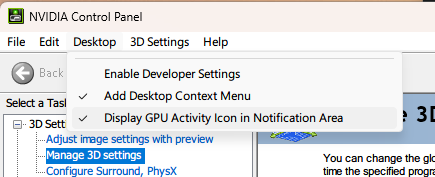
<p>Open the Nvidia control panel - Desktop -&gt; Display GPU Activity Icon in notification area.</p>

<p><img src="https://raw.githubusercontent.com/xtenduke/xtenduke.github.io/7e74a7d8c323a8f589b38ffa7a11085ec7e088e8/assets/images/nvidia-dgpu-cp-option.png" alt="nvcp" title="nvcp" />
<img src="https://raw.githubusercontent.com/xtenduke/xtenduke.github.io/7e74a7d8c323a8f589b38ffa7a11085ec7e088e8/assets/images/nvidia-dgpu-tray.png" alt="tray" title="tray" /></p>

<h3 id="solution">Solution</h3>
<p>Disable and re-enable the nvidia dGPU when you undock.
The <code class="language-plaintext highlighter-rouge">battery.ps1</code> powershell script disables the nvidia GPU and re-enables it which effectively kicks all processes running on the dGPU off. Be warned that this may unsafely kill any applications you are using that depend on the dGPU, but i’ve had no issues with things like browsers etc, ymmv.</p>

<p><code class="language-plaintext highlighter-rouge">battery.ps1</code></p>
<pre><code class="language-battery.ps1">Get-PnpDevice -Class "Display" | Where-Object Manufacturer -eq "NVIDIA" | Disable-PnpDevice -Confirm:$false
Get-PnpDevice -Class "Display" | Where-Object Manufacturer -eq "NVIDIA" | Enable-PnpDevice -Confirm:$false
</code></pre>

<p>I used this command prompt convenience script to call the PS script manually, but for long term use you probably want to automate this based on power events or display PNP events.</p>

<p><code class="language-plaintext highlighter-rouge">battery.cmd</code></p>
<pre><code class="language-battery.cmd">powershell -ExecutionPolicy Bypass -File c:\Users\jake\Desktop\battery.ps1
</code></pre>

<h3 id="result">Result</h3>
<p>‘convincing’ the dGPU to turn off changes this machine from having 1.5h battery life, to 3-4h (usage dependant), which I consider a massive win. Even if I am forced to run windows.</p>]]></content><author><name>Jake Laurie</name></author><category term="linux" /><summary type="html"><![CDATA[Nvidia hybrid gpu setups in linux are incredibly painful due to poor driver support, nvidia drivers don’t properly support being run as a secondary gpu, I could go on and on about this…]]></summary></entry><entry><title type="html">Fedora 38 - nVidia driver issues after update</title><link href="/linux/2023/06/27/nvidia.html" rel="alternate" type="text/html" title="Fedora 38 - nVidia driver issues after update" /><published>2023-06-27T23:52:24+00:00</published><updated>2023-06-27T23:52:24+00:00</updated><id>/linux/2023/06/27/nvidia</id><content type="html" xml:base="/linux/2023/06/27/nvidia.html"><![CDATA[<p>Nvidia drivers on my Fedora 38 machine stopped working after an update, my usual debugging steps didn’t work.
Symptoms were choppy rendering and high gnome-shell cpu usage, huh..</p>

<p>So I ran <code class="language-plaintext highlighter-rouge">nvidia-smi</code> to see what was going on</p>

<div class="language-plaintext highlighter-rouge"><div class="highlight"><pre class="highlight"><code> $ nvidia-smi
 Failed to initialize NVML: Driver/library version mismatch
 NVML library version: 535.54
</code></pre></div></div>

<p>Weird, i’m not that familiar with nvidia driver packages, I assume something’s been overwritten / a partial update has occurred. Time to reinstall akmod-nvidia and reboot.</p>

<div class="language-plaintext highlighter-rouge"><div class="highlight"><pre class="highlight"><code> $ sudo dnf reinstall akmod-nvidia
 ...
 # reboot... 
</code></pre></div></div>

<p>Still no luck, lets make sure that the nvidia kernel modules are loaded</p>

<div class="language-plaintext highlighter-rouge"><div class="highlight"><pre class="highlight"><code> $ lsmod | grep nvidia
nvidia_drm             94208  13
nvidia_modeset       1560576  18 nvidia_drm
nvidia_uvm           3493888  0
nvidia              62517248  978 nvidia_uvm,nvidia_modeset
video                  73728  2 asus_wmi,nvidia_modeset
</code></pre></div></div>

<p>Looks fine, check dmesg for issues?</p>

<div class="language-plaintext highlighter-rouge"><div class="highlight"><pre class="highlight"><code> $ sudo dmesg | grep nvidia
</code></pre></div></div>

<p>And I found this</p>

<div class="language-plaintext highlighter-rouge"><div class="highlight"><pre class="highlight"><code>[   34.453610] NVRM: API mismatch: the client has the version 535.54.03, but
               NVRM: this kernel module has the version 530.41.03.  Please
               NVRM: make sure that this kernel module and all NVIDIA driver
               NVRM: components have the same version.
</code></pre></div></div>

<p>Not really sure what NVRM is, but I assume it’s part of nVidia driver or cuda libs, so I reinstalled the driver, and the cuda package to no avail…</p>

<p>It seems NVRM is closely related to the nvidia kernel module, lets rebuild the initramfs and reboot.</p>

<div class="language-plaintext highlighter-rouge"><div class="highlight"><pre class="highlight"><code> $ sudo dracut -f
</code></pre></div></div>

<p>Success! After rebuilding initramfs and rebooting, I have HW acceleration back, and nvidia-smi is reporting.</p>

<div class="language-plaintext highlighter-rouge"><div class="highlight"><pre class="highlight"><code>$ nvidia-smi
Wed Jun 28 07:42:25 2023
+---------------------------------------------------------------------------------------+
| NVIDIA-SMI 535.54.03              Driver Version: 535.54.03    CUDA Version: 12.2     |
|-----------------------------------------+----------------------+----------------------+
| GPU  Name                 Persistence-M | Bus-Id        Disp.A | Volatile Uncorr. ECC |
| Fan  Temp   Perf          Pwr:Usage/Cap |         Memory-Usage | GPU-Util  Compute M. |
|                                         |                      |               MIG M. |
|=========================================+======================+======================|
|   0  NVIDIA GeForce RTX 3080 Ti     Off | 00000000:08:00.0  On |                  N/A |
|  0%   49C    P8              19W / 350W |    792MiB / 12288MiB |      0%      Default |
|                                         |                      |                  N/A |
+-----------------------------------------+----------------------+----------------------+
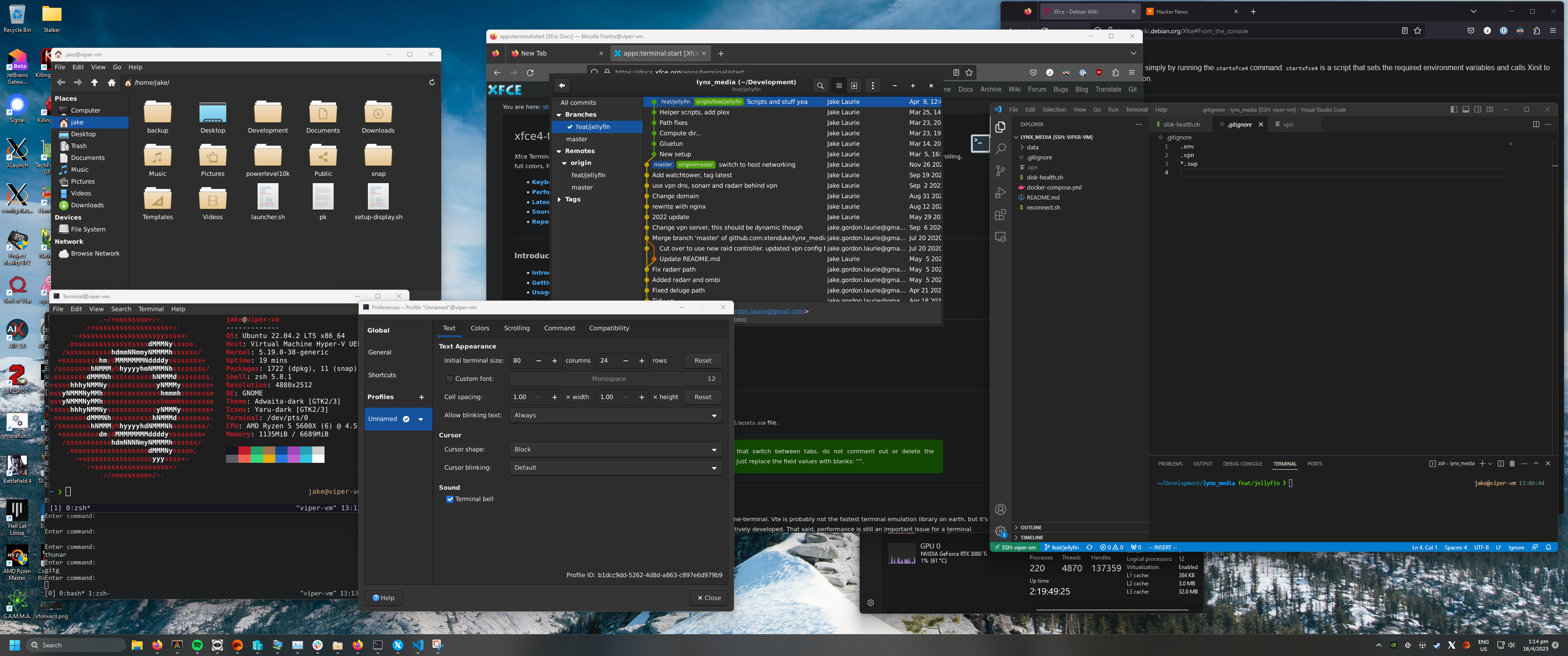
</code></pre></div></div>]]></content><author><name>Jake Laurie</name></author><category term="linux" /><summary type="html"><![CDATA[Nvidia drivers on my Fedora 38 machine stopped working after an update, my usual debugging steps didn’t work. Symptoms were choppy rendering and high gnome-shell cpu usage, huh..]]></summary></entry><entry><title type="html">Xfowarding Hyper-V VMs in Windows</title><link href="/linux/2023/04/16/xforwarding.html" rel="alternate" type="text/html" title="Xfowarding Hyper-V VMs in Windows" /><published>2023-04-16T02:40:16+00:00</published><updated>2023-04-16T02:40:16+00:00</updated><id>/linux/2023/04/16/xforwarding</id><content type="html" xml:base="/linux/2023/04/16/xforwarding.html"><![CDATA[<h2 id="xforwarding-gnulinux-applications-into-your-windows-environment">XForwarding gnu/linux applications into your Windows environment</h2>

<p><img src="https://raw.githubusercontent.com/xtenduke/xtenduke.github.io/dd981bf1f297b5b98b977b897b7af6de6335971a/assets/images/xforward.png" alt="XForwarded Desktop" title="Xforwarded desktop" /></p>

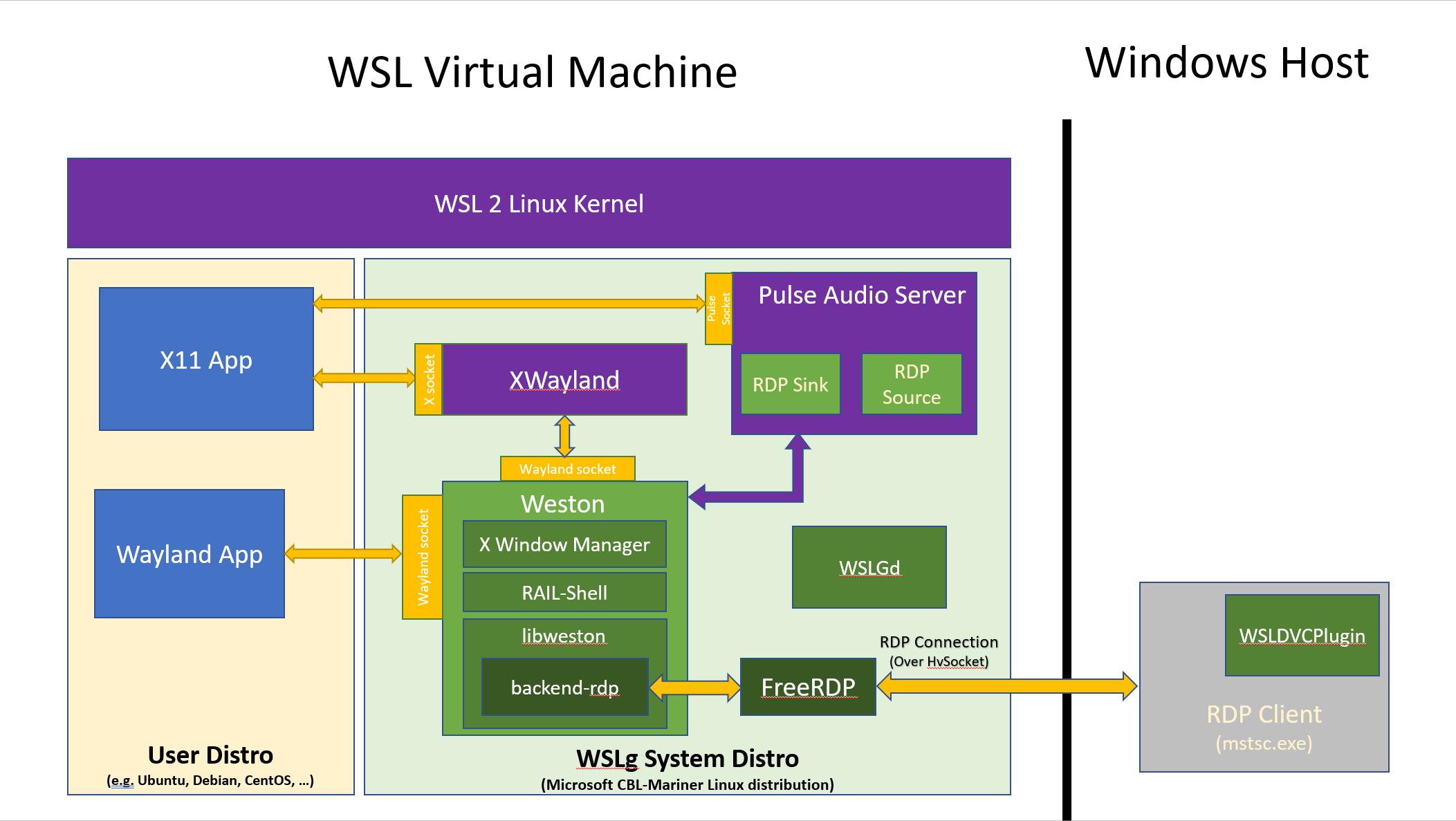
<h2 id="wslg">WSLg</h2>
<p>Microsoft’s WSLg really impressed me, it gives you the ability to run GPU accelerated graphical linux applications in Windows through a RDP over a HV socket. While WSL(2) and WSLg are super cool pieces of cobbled together tech (yeah I love jank), the drawbacks I have found in WSL far outweighed the convenience of being able to launch graphical applications from windows.</p>

<p><img src="https://raw.githubusercontent.com/xtenduke/xtenduke.github.io/c6902a08b838aaa54242272d6c187a26abaea585/assets/images/wsl-wayland.png" alt="WSLg" title="WSLg" /></p>

<h2 id="why-not-wslg">Why not WSLg</h2>

<ul>
  <li>No “good” way to pass through USB devices. Forced to use USB over IP</li>
  <li>Performance issues</li>
  <li>Networking weirdness</li>
  <li>Slow filesystem</li>
</ul>

<h2 id="ditching-wsl">Ditching WSL</h2>
<p>I expect these issues to be resolved in the future, but in the meantime, due to these drawbacks, I ended up running linux VMs in Hyper-V, accessing them over SSH.
This gives almost native performance, Hyper-v is a type 1 hypervisor, in contrast to other offerings like Virutalbox (yuck, Oracle), or VMware Workstation ($$).</p>

<h2 id="graphical-applications">Graphical applications</h2>
<p>The main drawback of running linux in Hyper-V is the terrible graphical performance in the rare case that I need to run a gui app. Tools like the Remote extension for VS Code, and Jetbrains Gateway give you the ability to have a Windows gpu accelerated IDE, which is really sending instructions to a remote machine over SSH (my linux VM in this case).</p>

<p>But what if you want to run other GUI applications?</p>

<h2 id="xfowarding-into-windows">XFowarding into windows</h2>
<p>There are a few ways to do this, the best way I have found is to use a piece of commercial software called <a href="https://www.google.com/url?sa=t&amp;rct=j&amp;q=&amp;esrc=s&amp;source=web&amp;cd=&amp;cad=rja&amp;uact=8&amp;ved=2ahUKEwi0yvui3K3-AhVA-jgGHTiKB2IQFnoECAwQAQ&amp;url=https%3A%2F%2Fx410.dev%2F&amp;usg=AOvVaw0pWaga9LvxlM_MbiFptB1h">X410</a></p>

<p>Setup is reasonably straight forward, I followed the VSock <a href="https://www.google.com/url?sa=t&amp;rct=j&amp;q=&amp;esrc=s&amp;source=web&amp;cd=&amp;cad=rja&amp;uact=8&amp;ved=2ahUKEwi0yvui3K3-AhVA-jgGHTiKB2IQFnoECAwQAQ&amp;url=https%3A%2F%2Fx410.dev%2F&amp;usg=AOvVaw0pWaga9LvxlM_MbiFptB1h">guide</a> as connecting over a Hyper-V specific mechanism seemed “nicer” to me than exposing another endpoint on my machine.</p>

<h2 id="xfowarding-issues">XFowarding Issues</h2>
<h3 id="gnome">Gnome</h3>
<p>Gnome often had issues starting, I figured there was some incompatibility with the X410 xserver implementation. Since i’m not really using the Gnome desktop environment, just windows management, XFCE4 is a much better option.</p>

<h3 id="launching-applications-sucks">Launching applications… sucks</h3>

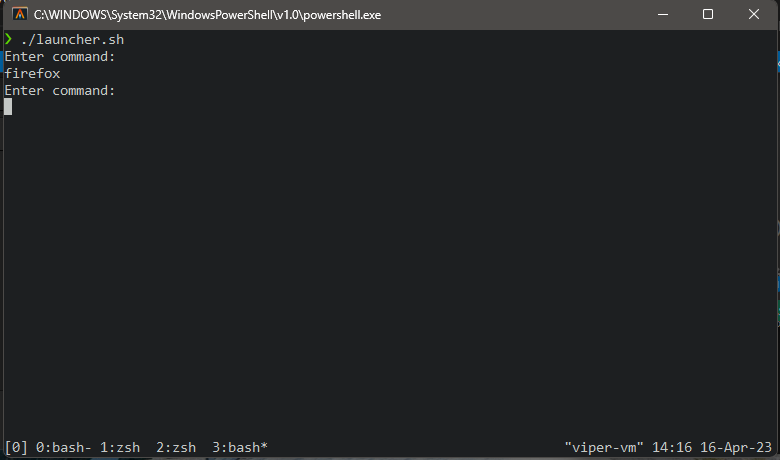
<p>Unlike WSLg, there is no nice Windows explorer integration to launch apps, to get around this you could run an application launcher like Rofi or similar. Since I will always have a terminal window open, I just wrote a script that detaches commands you type, and sends output to /dev/null</p>

<p><img src="https://raw.githubusercontent.com/xtenduke/xtenduke.github.io/dd981bf1f297b5b98b977b897b7af6de6335971a/assets/images/launcher.png" alt="Janky application launcher" title="Janky application launcher" /></p>

<div class="language-plaintext highlighter-rouge"><div class="highlight"><pre class="highlight"><code>#!/bin/bash

run () {
    echo "Enter command:"
    read command
    exec $command &lt;/dev/null &amp;&gt;/dev/null &amp;
    run
}

run
</code></pre></div></div>

<h2 id="hardware-acceleration">Hardware acceleration</h2>
<p>Graphics performance is fine for web browsing and other non-demanding tasks. Unfortunately, there is no direct access to the GPU, this means no GPU accelerated ML tasks, or native video encode/decode.</p>

<h2 id="whats-next">What’s next?</h2>
<p>I am investigating the possibility of replicating Microsofts WSLg implementation on Hyper-V VMs, stay tuned.</p>]]></content><author><name>Jake Laurie</name></author><category term="linux" /><summary type="html"><![CDATA[XForwarding gnu/linux applications into your Windows environment]]></summary></entry><entry><title type="html">K8s DNS resolution issues</title><link href="/kubernetes/2021/06/25/k8s-dns.html" rel="alternate" type="text/html" title="K8s DNS resolution issues" /><published>2021-06-25T02:40:16+00:00</published><updated>2021-06-25T02:40:16+00:00</updated><id>/kubernetes/2021/06/25/k8s-dns</id><content type="html" xml:base="/kubernetes/2021/06/25/k8s-dns.html"><![CDATA[<p>Recently, I have ‘discovered’ DNS lookup issues from pods in K3S on my Raspberry Pi cluster.<br />
It seems that some pods on the same node, seemingly at random have DNS lookup issues, although DNS on the host works just fine.<br />
A host restart of the Node with the problem usually resolves the issue, but i’d rather get to the bottom of it.</p>

<p>Node (pi0)</p>
<div class="language-plaintext highlighter-rouge"><div class="highlight"><pre class="highlight"><code>&lt;&lt;K9s-Shell&gt;&gt; Pod: default/defiant-defiant-kube-5768879777-6gxv8 | Container: defiant-kube 
/app # nslookup defiant-defiant-kube.default.svc.cluster.local
;; connection timed out; no servers could be reached

/app # nslookup google.com
;; connection timed out; no servers could be reached

/app # 
</code></pre></div></div>

<p>Host (pi0)</p>
<div class="language-plaintext highlighter-rouge"><div class="highlight"><pre class="highlight"><code>Last login: Sun Jul 25 05:21:24 2021 from 192.168.1.239
ubuntu@pi0:~$ nslookup google.com
Server:         127.0.0.53
Address:        127.0.0.53#53

Non-authoritative answer:
Name:   google.com
Address: 142.250.66.174

ubuntu@pi0:~$ 
</code></pre></div></div>

<p>Node (pi1)</p>
<div class="language-plaintext highlighter-rouge"><div class="highlight"><pre class="highlight"><code>/app # nslookup defiant-defiant-kube.default.svc.cluster.local
Server:         10.43.0.10
Address:        10.43.0.10:53

Name:   defiant-defiant-kube.default.svc.cluster.local
Address: 10.42.3.131
Name:   defiant-defiant-kube.default.svc.cluster.local
Address: 10.42.0.114
[TRUNCATED]

/app # nslookup google.com
Server:         10.43.0.10
Address:        10.43.0.10:53

Non-authoritative answer:
Name:   google.com
Address: 142.250.204.14

/app # 

</code></pre></div></div>

<p>“no servers could be reached”<br />
For some reason, Nodes can’t reach the node-local DNS server.</p>

<p><strong>Known issue?</strong><br />
Multiple users of K3s have reported this, and it seems that it is a kernel or distro issue, see<br />
<a href="https://github.com/k3s-io/k3s/issues/3624">https://github.com/k3s-io/k3s/issues/3624</a> and
<a href="https://github.com/k3s-io/k3s/issues/1527">https://github.com/k3s-io/k3s/issues/1527</a></p>

<p><strong>Temporary fix</strong><br />
 Configuring flannel (the container network interface used by k9s) to use <code class="language-plaintext highlighter-rouge">host-gw</code><br />
 The drawback to <code class="language-plaintext highlighter-rouge">host-gw</code> as the backend is that it requires layer2 connection between all nodes. as documented <a href="https://github.com/flannel-io/flannel/blob/master/Documentation/backends.md">here</a><br />
 This isn’t a problem for my deployment as they are all connected to the same switch.</p>]]></content><author><name>Jake Laurie</name></author><category term="kubernetes" /><summary type="html"><![CDATA[Recently, I have ‘discovered’ DNS lookup issues from pods in K3S on my Raspberry Pi cluster. It seems that some pods on the same node, seemingly at random have DNS lookup issues, although DNS on the host works just fine. A host restart of the Node with the problem usually resolves the issue, but i’d rather get to the bottom of it.]]></summary></entry><entry><title type="html">Configuring POE+ HAT Fan for Raspberry PI 4 on Ubuntu</title><link href="/rpi/2021/06/25/rpi-poe.html" rel="alternate" type="text/html" title="Configuring POE+ HAT Fan for Raspberry PI 4 on Ubuntu" /><published>2021-06-25T02:40:16+00:00</published><updated>2021-06-25T02:40:16+00:00</updated><id>/rpi/2021/06/25/rpi-poe</id><content type="html" xml:base="/rpi/2021/06/25/rpi-poe.html"><![CDATA[<p>For those who want to run Ubuntu64 bit distros and not the “beta” 64 bit distro of raspbian on their PI4 with POE+ Hat<br />
Unfortunately, the new POE+ hat fan does not work OOB in Ubuntu 21.04 (and probably in prior versions).<br />
Fortunately it is trivial to enable</p>

<p><strong>Verify you have no entry in</strong> <code class="language-plaintext highlighter-rouge">$ cat /sys/class/thermal/cooling_device0/type</code><br />
If you get back
<code class="language-plaintext highlighter-rouge">rpi-poe-fan</code><br />
you can skip to editing the firmware config file</p>

<p><strong>Make sure all packages are up to date</strong><br />
<code class="language-plaintext highlighter-rouge">$ apt update &amp;&amp; apt upgrade</code><br />
reboot the pi</p>

<p><strong>Install raspi-config package and raspi lib</strong><br />
<code class="language-plaintext highlighter-rouge">$ apt install libraspberrypi-bin raspi-config</code></p>

<p><strong>Run the raspi-config binary</strong><br />
<code class="language-plaintext highlighter-rouge">$ raspi-config</code><br />
select <code class="language-plaintext highlighter-rouge">Interface Options</code><br />
enable the I2c module<br />
reboot the pi</p>

<p><strong>Add the following to the firmware config file</strong> <code class="language-plaintext highlighter-rouge">/boot/firmware/config.txt</code><br />
It should be pre-popuated by many other config lines (by raspi-config)</p>
<div class="language-plaintext highlighter-rouge"><div class="highlight"><pre class="highlight"><code># fan
dtoverlay=rpi-poe
dtparam=poe_fan_temp0=80000,poe_fan_temp0_hyst=2000
dtparam=poe_fan_temp1=78000,poe_fan_temp1_hyst=5000
dtparam=poe_fan_temp2=73000,poe_fan_temp2_hyst=3000
dtparam=poe_fan_temp3=70000,poe_fan_temp3_hyst=5000

</code></pre></div></div>

<p>You can now reboot your system, the fan should kick in at 70 degrees celsius</p>]]></content><author><name>Jake Laurie</name></author><category term="rpi" /><summary type="html"><![CDATA[For those who want to run Ubuntu64 bit distros and not the “beta” 64 bit distro of raspbian on their PI4 with POE+ Hat Unfortunately, the new POE+ hat fan does not work OOB in Ubuntu 21.04 (and probably in prior versions). Fortunately it is trivial to enable]]></summary></entry></feed>